
About
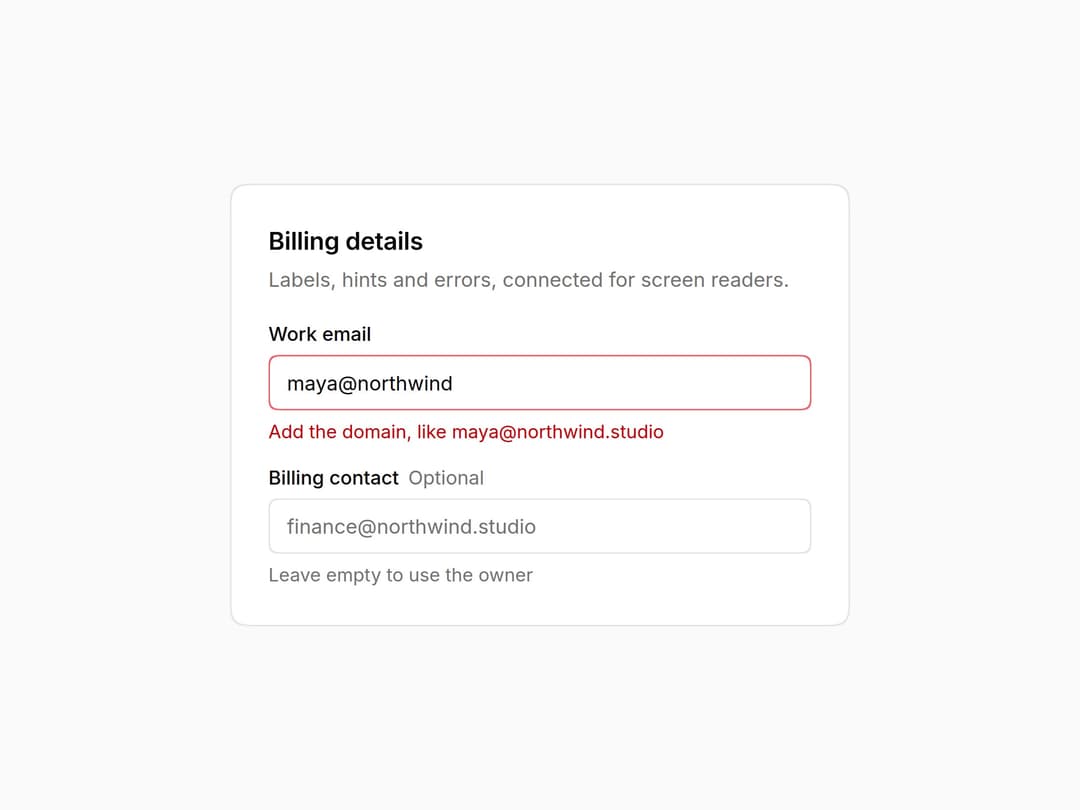
Form field that wires label, hint, error and required marker to any control through useFieldProps: ids, aria-describedby and aria-invalid done for you. Errors replace hints. Part of the Layro System: layro.vercel.app
Built with React and Tailwind. Copy the prompt and paste it into Claude Code, Cursor or Lovable: your agent adds Field to your project and fits it to your theme.
Code
How Field is used: the demo's code. The component's own source comes with a free account.
Usage.tsx
import * as React from "react";
import { Field, useFieldProps } from "@/components/ui/layro-field";

/* Field wires any control inside it: the label, the hint and the error are
   connected with ids automatically. Type an address without a domain and
   the error replaces the hint and is read out with the field. */

/* Any control can join in: useFieldProps hands it the id, aria-describedby
   and aria-invalid that the surrounding Field worked out. */
function TextInput(props: React.InputHTMLAttributes<HTMLInputElement>) {
  const field = useFieldProps(props);
  return (
    <input
      {...props}
      {...field}
      className="h-9 w-full rounded-[10px] [corner-shape:squircle] bg-card px-3 text-[13px] ring-1 ring-inset ring-input outline-none placeholder:text-muted-foreground focus-visible:ring-2 focus-visible:ring-ring aria-invalid:ring-destructive/60"
    />
  );
}

export default function FieldDemo() {
  const [email, setEmail] = React.useState("maya@northwind");
  const invalid = !/^[^@\s]+@[^@\s]+\.[^@\s]+$/.test(email);
  return (
    <div className="flex min-h-screen w-full items-center justify-center bg-background p-6">
      <div className="w-full min-w-0 rounded-[18px] [corner-shape:squircle] bg-card p-6 text-card-foreground ring-1 ring-border" style={{ maxWidth: 400 }}>
        <h2 className="text-[16px] font-semibold tracking-[-0.01em]">Billing details</h2>
        <p className="mt-1 mb-5 text-[13px] text-muted-foreground">Labels, hints and errors, connected for screen readers.</p>
        <div className="grid gap-4">
          <Field label="Work email" hint="We send the receipt here" error={invalid ? "Add the domain, like [email protected]" : undefined} required>
            <TextInput type="email" value={email} onChange={(e) => setEmail(e.target.value)} />
          </Field>
          <Field label="Billing contact" optional hint="Leave empty to use the owner">
            <TextInput placeholder="[email protected]" />
          </Field>
        </div>
      </div>
    </div>
  );
}
Dependencies
More by Mohamed Uvaish
View all

Signature Pad
435
Folder Card
347
Share Dialog
313
Kanban Board
271
Notification Panel
112
Charts & KPI Cards
100
Web Shot Button
57
Rich Text Editor
50
More in Forms
View all

Premium Auth
524

Contact Card
1K

Book A Demo 1
73

Login 1
53

Form
137

Card Studio
41
SignInPage
668

Modern & Stunning sign in
1.6K
