
About
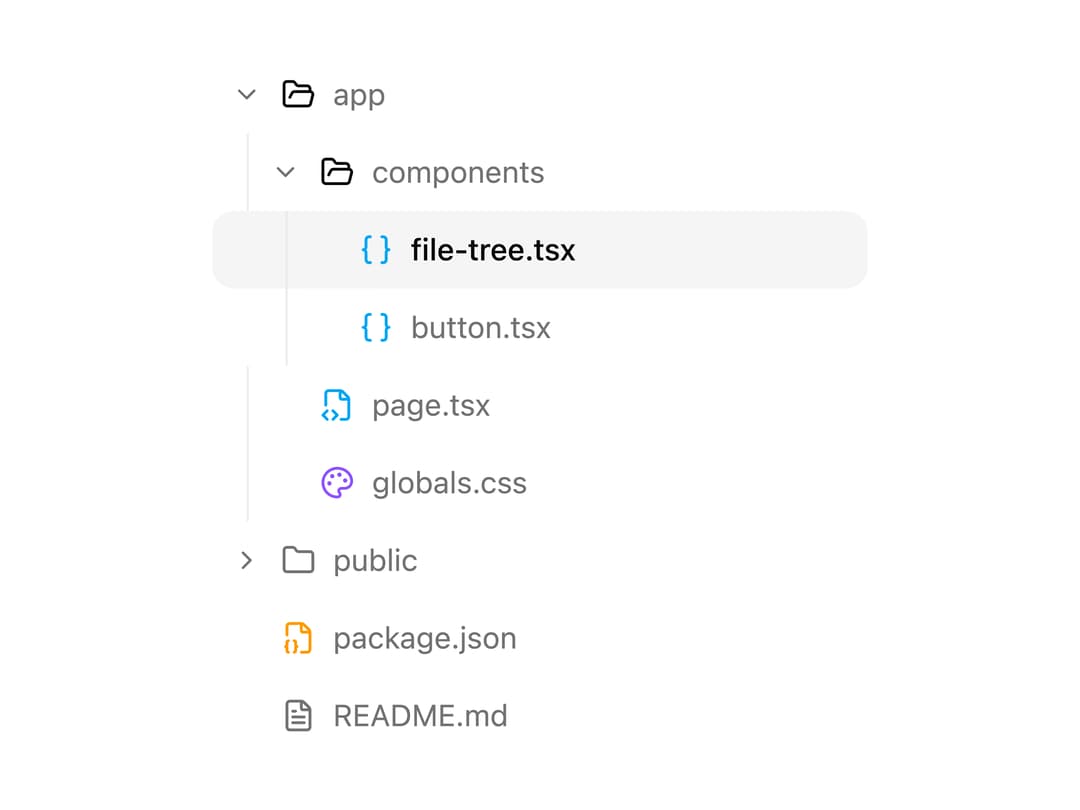
A keyboard-navigable file/folder tree view with expandable branches and an animated selection highlight, for displaying a project's directory structure.
Built with React and Tailwind. Copy the prompt and paste it into Claude Code, Cursor or Lovable: your agent adds File Tree to your project and fits it to your theme.
Code
How File Tree is used: the demo's code. The component's own source comes with a free account.
Usage.tsx
"use client";

import {
  FileTree,
  FileTreeFile,
  FileTreeFolder,
} from "@/components/ui/file-tree";
import { Braces, FileCode2, FileJson2, FileText, Palette } from "lucide-react";

export default function FileTreeDemo() {
  return (
    <div className="flex min-h-[420px] w-full items-start justify-center px-4 pt-10">
      <div className="w-full max-w-xs p-2">
        <FileTree
          defaultValue="file-tree"
          defaultExpandedIds={["app", "components"]}
          ariaLabel="Project files"
        >
          <FileTreeFolder value="app" name="app">
            <FileTreeFolder value="components" name="components">
              <FileTreeFile
                value="file-tree"
                name="file-tree.tsx"
                icon={<Braces className="size-4 text-sky-500" />}
              />
              <FileTreeFile
                value="button"
                name="button.tsx"
                icon={<Braces className="size-4 text-sky-500" />}
              />
            </FileTreeFolder>
            <FileTreeFile
              value="page"
              name="page.tsx"
              icon={<FileCode2 className="size-4 text-sky-500" />}
            />
            <FileTreeFile
              value="styles"
              name="globals.css"
              icon={<Palette className="size-4 text-violet-500" />}
            />
          </FileTreeFolder>
          <FileTreeFolder value="public" name="public">
            <FileTreeFile value="logo" name="logo.svg" />
            <FileTreeFile value="grid" name="grid.svg" />
          </FileTreeFolder>
          <FileTreeFile
            value="package"
            name="package.json"
            icon={<FileJson2 className="size-4 text-amber-500" />}
          />
          <FileTreeFile
            value="readme"
            name="README.md"
            icon={<FileText className="size-4 text-muted-foreground" />}
          />
        </FileTree>
      </div>
    </div>
  );
}
Dependencies
More by Saurabh
View all
BeUI Tilt Card
374
BeUI Expandable Tabs
351
BeUI File Upload
296
BeUI Bouncy Accordion
206
Animated Sidebar
200
BeUI Create Menu
199
BeUI Expanable Action Bar
194
Loader
187
More in Navigation
View all

Sidebar
286
Navbar
1

Tabs
34
Oversized 404 Numeral
57

Breadrcrumb
8

Pagination
91

Sidebar
348
Pagination
15


