
About
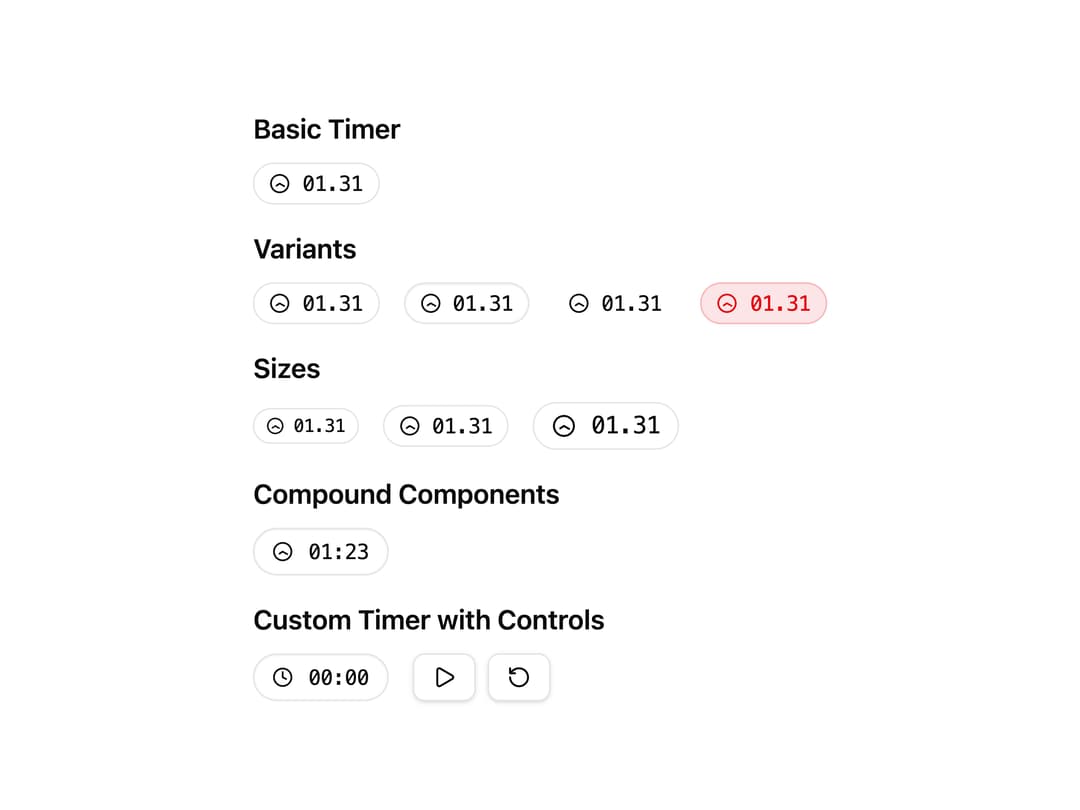
A countdown/stopwatch timer component with customizable duration, variants, sizes, and compound parts for building custom timers.
Built with React and Tailwind. Copy the prompt and paste it into Claude Code, Cursor or Lovable: your agent adds Timer to your project and fits it to your theme.
Code
How Timer is used: the demo's code. The component's own source comes with a free account.
Usage.tsx
"use client"

import { Pause, Play, RotateCcw } from "lucide-react"

import { Button } from "@/components/ui/button"
import {
  Timer,
  TimerDisplay,
  TimerIcon,
  TimerRoot,
  useTimer,
} from "@/components/ui/timer"

export default function TimerExamples() {
  return (
    <div className="space-y-8 p-6">
      <div className="space-y-4">
        {/* Basic Timer */}
        <div className="space-y-2">
          <h3 className="text-lg font-semibold">Basic Timer</h3>
          <Timer loading={true} />
        </div>

        {/* Variants */}
        <div className="space-y-2">
          <h3 className="text-lg font-semibold">Variants</h3>
          <div className="flex gap-4 flex-wrap">
            <Timer variant="default" loading={true} />
            <Timer variant="outline" loading={true} />
            <Timer variant="ghost" loading={true} />
            <Timer variant="destructive" loading={true} />
          </div>
        </div>

        {/* Sizes */}
        <div className="space-y-2">
          <h3 className="text-lg font-semibold">Sizes</h3>
          <div className="flex gap-4 items-center flex-wrap">
            <Timer size="sm" loading={true} />
            <Timer size="md" loading={true} />
            <Timer size="lg" loading={true} />
          </div>
        </div>

        {/* Compound Components */}
        <div className="space-y-2">
          <h3 className="text-lg font-semibold">Compound Components</h3>
          <TimerRoot variant="outline" size="lg">
            <TimerIcon loading={true} />
            <TimerDisplay time="01:23" />
          </TimerRoot>
        </div>

        {/* Custom Timer with Controls */}
        <CustomTimerExample />
      </div>
    </div>
  )
}

function CustomTimerExample() {
  const { formattedTime, isRunning, start, stop, reset } = useTimer({
    format: "MM:SS",
  })

  return (
    <div className="space-y-2">
      <h3 className="text-lg font-semibold">Custom Timer with Controls</h3>
      <div className="flex items-center gap-4">
        <TimerRoot variant="outline" size="lg">
          <TimerIcon loading={isRunning} />
          <TimerDisplay time={formattedTime.display} />
        </TimerRoot>

        <div className="flex gap-2">
          <Button
            size="sm"
            variant="outline"
            onClick={isRunning ? stop : start}
          >
            {isRunning ? (
              <Pause className="w-4 h-4" />
            ) : (
              <Play className="w-4 h-4" />
            )}
          </Button>
          <Button size="sm" variant="outline" onClick={reset}>
            <RotateCcw className="w-4 h-4" />
          </Button>
        </div>
      </div>
    </div>
  )
}
Dependencies
More by cult/ui
View all
3D Carousel
2.5K
Logo Carousel
1.1K
Feature Carousel
510
Popover Form
420
Floating Panel
250
Expandable
131
Dock
120
Hero Liquid Metal
106
More in Buttons
View all

Button
5
Texture Button
97

Button Group


Eclipse Button
39
Button
4

HeroUI Button Group

Base Button
4

App Store Button
458
