
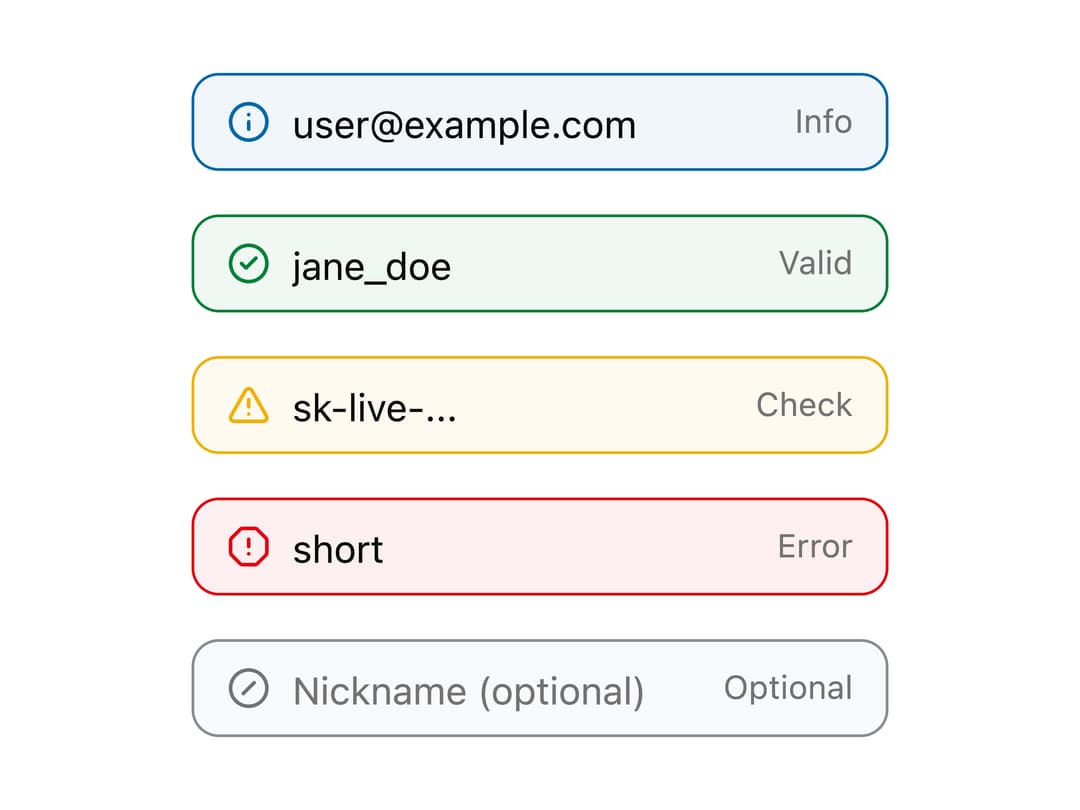
About
A styled text input with a leading status icon and trailing helper text, available in five semantic tones (info, success, warning, danger, muted) for form validation states.
Built with React and Tailwind. Copy the prompt and paste it into Claude Code, Cursor or Lovable: your agent adds Group Tone Input to your project and fits it to your theme.
Code
How Group Tone Input is used: the demo's code. The component's own source comes with a free account.
Usage.tsx
import {
  InfoGroup,
  SuccessGroup,
  WarningGroup,
  DangerGroup,
  MutedGroup,
} from "@/components/ui/input-group-tone";

export default function InputGroupToneDemo() {
  return (
    <div className="flex min-h-screen w-full items-center justify-center bg-background p-8">
      <div className="flex flex-col gap-4">
        <InfoGroup
          placeholder="[email protected]"
          defaultValue="[email protected]"
        />
        <SuccessGroup placeholder="Username" defaultValue="jane_doe" />
        <WarningGroup placeholder="API key" defaultValue="sk-live-..." />
        <DangerGroup placeholder="Password" defaultValue="short" />
        <MutedGroup placeholder="Nickname (optional)" />
      </div>
    </div>
  );
}
Dependencies
More by ai 2
View all
Ripple Buttons
31
Styled Toggle Switches
17
Styled Progress Bars
15
Styled Badges
10
Particle Toggles
8
OTP Pin Input
8
Combo Kbd
7
Shapes Skeleton
6
More in Forms
View all

Premium Auth
524

Contact Card
1K

Book A Demo 1
73

Login 1
53

Form
137

Card Studio
41

Modern & Stunning sign in
1.6K
SignInPage
667
